How to Remove or Disable Facebook Timeline Easily!

Posted by Unknown Kamis, 14 Juni 2012 0 komentar
Here i have got a really very good news for those who hate the ‘Timeline’ feature on Facebook and want to get rid of it to get back on their old Facebook profile or dimply want to Remove Timeline from their Facebook profile. So,by using this tricks you’ll be able to see your Facebook profile in old view and also whenever you are viewing your friends profile.
Remove Facebook Timeline
One thing should be clear before i start, Facebook has officially turned of this feature, so this is just a trick, not a permanent solution.

Timeline remover is an extension for Internet Explorer, Mozilla Firefox and Google Chrome using which you can view Facebook profile and pages in the old and classic way.
Delete Facebook Timeline
To remove timeline please follow this instructions:

1. Download the extension for ChromeFirefox and Internet Explorer. Download and install the extension as per the browser that you are using.

2. After installing this extension, restart your browser. Now open your Facebook Timeline.  your old profile is back. Whenever you view yours and other’s profiles, this extension will display the profile in the old style.
Timeline Remover Toggle
Note: In case if you want to view Timeline again, then you can toggle this timeline on and off anytime.

If you are thinking this is too much to follow, then just go to your browser address bar and type:  m.facebook.com  and see your Timeline is vanish! have some fun!

For more facebook tricks Click Here.

Feel free to comment...

Baca Selengkapnya ....

Create A File or Folder Without any Name and Make Folders Invisiable

Posted by Unknown Minggu, 10 Juni 2012 0 komentar
Do you want to protect your file folders from any kind of unauthorized access? If so, go on. By reading this article you will be able to hide and protect your file folders without any third party software.

Hey guys, this is a very short and simple trick that works on windows. Here we’ll do two things using this trick.
No Nmae Folder Icon

1. Creating a file or folder without any name.
2. And make those folders invisible.


First trick:

1. Create new or select a folder or file.
2. Right click on it, select ‘Rename’ or simply press ‘F2’.
3. Press and hold ‘Alt’ key and type numbers ‘0160’ from the numpad (not the numbers which are present on top of the character key).
3. Press Enter and the File or Folder will be created with ‘NO! Name’.

Now, if you want to make more nameless file or folder in same directory than follow this:

1. Select file or folder to Rename.
2. Press and hold ‘Alt’ key and type ‘0160’ from numpad.
3. Release the ‘Alt’ key. Now without doing anything else, again hold ‘Alt’ key and type ‘0160’.
4. Press Enter and you will have second nameless folder in same directory.
5. To create many nameless folder or files on same directory repeat step3.

Why this is happening: The file or folders that seems nameless actually named with ‘space’.


Second Trick:

1. Right click on a folder and select properties.
2. Click on Customize tab and click Change Icon button.
Change Icon screen
3. You will see some invisible icon, select one and apply it.
4. You are done, your folder is now invisible.
Invisible Folder Icon
 Note: to see those files or folders again when it is invisible press ‘Ctrl+A’.

If you like this trick please feel free to comment!

Baca Selengkapnya ....

Change Firefox Master Password Without Old Password

Posted by Unknown Jumat, 08 Juni 2012 0 komentar
Many advance Firefox users use Master Password feature to protect all of their locally stored usernames and passwords with a master password.
The topic is, if you forgot your Master Password or want to change someone Firefox master password but you don't have his/her old password then How to do it. Let's see:
Firefox Logo
Step1: Open up your Firefox.
Step2: In the Firefox location bar, enter the following location:


chrome://pippki/content/resetpassword.xul

Step3: Press Enter.
Step4: The "Reset Master Password" page will appear. Click the 'Reset' button, to reset your master password.
Firefox Master Password Reset

Note: Resetting your master password will remove all of your saved usernames and passwords.

If you like this trick you can also see my previous post about Firefox 'Turn Your Firefox Into a Keylogger Without any Software and steal all of your friends pass'

Please feel free to like our posts and leave comments! 

Baca Selengkapnya ....

How To Make A Windows xp,7,vista Bootable Flash Drive!

Posted by Unknown Selasa, 05 Juni 2012 0 komentar
Booting from a flash drive is faster than from a DVD, and the USB drive can be configured to store data between sessions. That is why many people are using USB boot formula.
Here i describing the most easiest way to make a bootable Windows xp, win7 or vista Flash/pen drive.
Make Bootabl Pendrive
You should need few  things: 
1. Winto Flash portable software
2. A Flash/Pen drive [minimum 2 GB for xp and 4 GB for 7 & vista]
3. Windows xp/7/vista setup file. [copy from a bootable CD or DVD on your hard disk]

Note:your computer should have Removable/Flash Drive boot  support. And you do not need to install win to flash on your pen or flash drive.


Now how to:
Step:1  Download the following software from here.

Step:2  Insert your Flash drive.
Insert Pen Drive
Step:3  Open the software. Click on the following tick button.
Open Win to Flash
Step:4  Press Next.
Press Next
Step:5  Now locate your windows setup file folder and select your Flash drive.
set boot file drive
Step:6  Accept the license agreement and hit continue.
accept license agreement

You have done well. Now use your brand new USB flash boot drive whenever you want.


You cal also see How To Hack Win xp/7/Vista Password easily!

Leave us a comment if this post was useful for you.

Baca Selengkapnya ....

Download Nitro Pro 7 Professional PDF Editor Tools!

Posted by Unknown Senin, 04 Juni 2012 0 komentar
Nitro Pro lets you quickly create, convert, combine, edit, sign, and share 100% industry-standard PDF files for superior results and savings. Nitro’s easy-to-use PDF tools make working with digital documents pain free.

This software worth is about $200. but you can download and use it free from here.

Free Nitro Pro7

Key Features:

1. Create & Combine
2. Edit text & Images
3. Convert & Export
4. Scan & OCR
5. Collaborate & Review
6. Approve, sign & Submit
7. Control & Protect

Download Link: (Inc. creak)
http://www.mediafire.com/?99pu2acn8xcof5d

Instruction to use creak:

1. Unzip the file, u'll found it with a creak & plug_ins named folder.
2. Run the fill: nitro_pdf_professional7.exe and complete installation.
3. Now open creak folder and copy those files and past to: C:\Program Files\Nitro PDF\Professional 7
4.  Again Copy the file from plug_Ins and past to: C:\Program Files\Nitro PDF\Professional 7\plug_ins
5. You all done.

Enjoy the features of professional software full free. Thank You.

Baca Selengkapnya ....

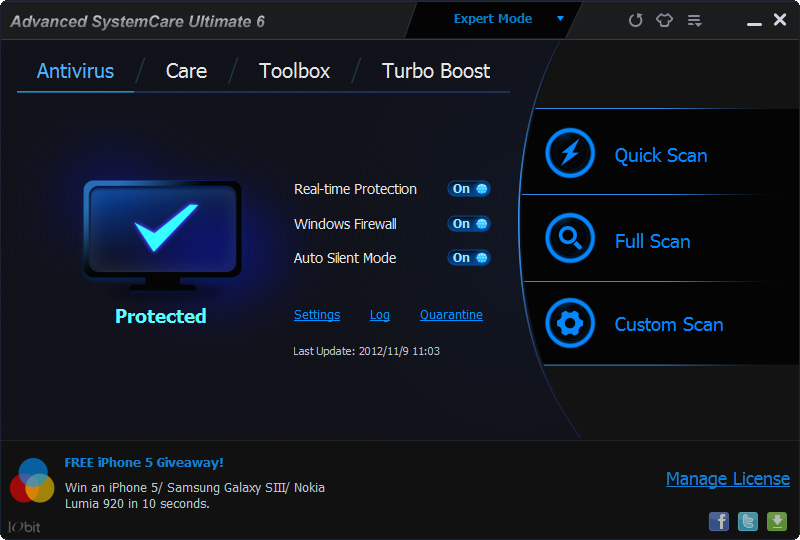
Download Advance System Care Ultimate 6 With 1 Year Lisence Validity!

Posted by Unknown Minggu, 03 Juni 2012 0 komentar
Advanced System Care Ultimate 6 provides an always-on, automated, all-in-one PC Healthcare Service with anti-spyware, privacy protection, performance tune-ups, and system cleaning capabilities. This powerful and award-winning precision tool fixes stubborn errors, cleans out clutter, optimizes Internet and download speeds, ensures personal security, and maintains maximum computer performance automatically.

Note: You might also like to download Advance System Optimizer Pro!

Advance system care 6
Key benefits of this software:

1. Keeps your PC running at peak performance Enhanced
2. Defends PC security with extra protection Enhanced
3. One click to solve as many as 10 common PC problems Enhanced
4. Real-time optimization with Active Boost function New!
5. More than 20 dedicated smart tools for everyday PC maintenance Enhanced
Advance system care 6 license
6. Cloud technology to keep database up-to-date New!
7. Boost your PC for working and gaming Enhanced
8. Next-generation registry deep clean and optimizer Enhanced   
9. Automatically works in the background New
10. UI technology for quicker start and less resource usage New!
Advance system care 6 toolbox
11.  New architecture and re-written source codes for 32bit/64bit system New!
12.  Improved Care module with more powerful clean and optimization functions Enhanced
13. Powerful hard drive fragmentation Free,
14. Award-winning customer support for all users.


Download Link:
Advance System Care Ultimate

Please feel free to comment if this post was helpful!

Baca Selengkapnya ....

Recover Your Lost or Deleted Data From Any Drive or Disk

Posted by Unknown Selasa, 17 April 2012 0 komentar
Today I'll introduce a very powerful data recovery software called EaseUS Data Recovery Wizard Professional, Here you can download a copy of professional business edition. so let's have a look about this software and its key features. 

EasyUS Data recovery Pro
  Key Features!
  • Recover deleted or lost files even if emptied from the Recycle Bin.
  • File recovery after accidental format, even if you have reinstalled Windows.
  • Disk recovery after a hard disk crash.
  • Get back files after a partitioning error.
  • Get data back from RAW hard drives.
  • Recover documents, photos, video music and email.
  • Recover from hard drive, camera card, USB, Zip, floppy disk or other media.
  • English & German language support.
  • Windows 2000/XP/2003/Vista/2008 R2 SP1/Windows 7 SP1.
  • Specify file types before file recovery to find lost files quickly.
  • Save previous searching results for continuous recovery.
  • Faster scan lost files by skipping bad sectors automatically.
  • High quality of file recovery. 

More Features :
  • Creates a Disk Image file for data recovery.
  • Intelligent search all possible file systems on hard drive.
  • Provides partition recovery from FAT12, FAT16, VFAT, FAT32, NTFS/NTFS5, file systems.
  • Supports IDE/ATA, SATA, SCSI, USB, Fire wire (IEEE1394) hard drive and other media such as Floppy disk, USB flash drive, digital camera, iPod, digital audio player etc.
  • Recovers deleted files and folders even after recycle bin has been emptied or use of Shift+Del key.
  • File recovery after accidental format, even if you have reinstalled Windows.
  • Recognizes and preserves long file names when restoring files and folders.
  • Recovers compressed and encrypted files on NTFS.
  • Previews the recovery files and pictures in BMP, EMF, JPG, JPEG, GIF, TIF and PNG format, etc.
  • Large and Multi-Disk Drive Support.
  • Views the recovered pictures with thumbnails.
  • High quality of file recovery.
  • Ability to resume the last recovery result.
  • Changes the size of recovered files.
  • Succinct and user friendly interface.
  • Recovers a specific file by right-click
 Now just Download and install it to get back your all lost data forever.

Download Link: http://www.mediafire.com/?kmu3dg9479l51ci 


Hope your data will never lost again. plz leave us a comment if you like this software !
Courtesy Here.

Baca Selengkapnya ....
Trik SEO Terbaru support Online Shop Baju Wanita - Original design by Bamz | Copyright of android amazon.