Tampilkan postingan dengan label Tips. Tampilkan semua postingan

iPhone How To Delete Apps - Tutorial

Posted by Unknown Selasa, 11 Februari 2014 0 komentar
Simple tasks like deleting a iOS app may be something that seem simple to a lot of iPhone / iPad users, but maybe educational to new iOS users.


How To Delete Apps From Your iPhone and iPad:

Deleting apps is important to do. They can take up a lot of your space on your device, and if you are not using them or have any need for them, why have them installed?

Deleting Apps is easy to do. Just follow these steps:

1. Unlock your device and get to the Home Screen.
2. Find the App you want to delete.
3. Press and hold on the Apps icon.
4. All the apps should begin to jiggle / shake.
5. On the top left hand corner of the App icon, will be a "X".
6. Press the "X".
7. A popup will appear. Confirm that you want to delete the App by pressing "Delete".  
8. To exit the edit mode (stop the Apps shaking), press the Home Button.


Related Posts:


Baca Selengkapnya ....

How to run Android on your Computer

Posted by Unknown Selasa, 04 Februari 2014 0 komentar

You can use Genymotion app to continue using your Android apps on a desktop PC or laptop.There are various methods (like Bluestacks) of running Android apps on a PC, but these can be tricky to set up and vary greatly in the levels of performance and compatibility. Genymotion is relatively simple to install and provides pre-packaged Android installations which you can download and run on your PC or Mac. Best of all, it's fast and supports accelerated graphics quick enough even to run cutting edge 3D games.

There is something special for Developers
For developers, it also supports battery and GPS widgets so you can emulate different charging and power scenarios and test out how apps work in different World locations.

How to download and run Genymotion
To download Genymotion, you will need to sign up at genymotion.com. Once you've validated your email address and signed in, you can elect to download a version for Windows with VirtualBox included, or a version for Windows, Mac OS, Ubuntu or Debian, which will require you to have VirtualBox already installed. Once you've installed the software, sign in with your Genymotion credentials and you can select from a list of virtual Android devices with varying hardware configurations and versions of the Android operating system. We would recommend downloading any of the latest available versions, which will fit comfortably on the screen and come bundled with Google apps. Your virtual Android device will then be automatically downloaded. All that remains for you to do is click the Play button and start it up. You can then sign into your new device with your Google account and download and run any apps you wish.

Don't forget to share article with friends using buttons below.


Baca Selengkapnya ....

App of the day - QuickPIC is the fastest image viewer in Android.

Posted by Unknown Rabu, 22 Januari 2014 0 komentar

App of the day : QuickPic
Price : FREE.
Prime use : A lightweight replacement for your stock gallery.
Pros : Light weight and lightning fast still free.

Most people only view their photos on the device they took them on so it makes sense
to make the viewing experience as pleasant as possible. That is exactly what this app offers.

QuickPic can either be used in addition to your stock gallery or can replace it entirely. Once installed, you can choose to openyour images through QuickPic or your standard gallery. If you're sold by it you could, if you have the option, make it the only gallery available on your device. The biggest benefit of QuickPic is speed. It is a lot quicker than any Android gallery and can handle hundreds of images without slowing down your phone, this is all because of robust cache system used in app. The images are presented in grids grouped by individual folders. Images are really bright and dynamic on the flick-throughpresentation mode. You can also choose which folders to include in your gallery and keep your private ones hidden.
You should also look at VSCO camera(capturing sharp photos) and Snapseed(editing photos with ease).

Thanks for the TIP Niraj Dodia.

Get QuickPic from Google play.

Find more app of the day


Baca Selengkapnya ....

How to backup your phone using ADB.

Posted by Unknown Senin, 20 Januari 2014 0 komentar

So you are rooting your phone? Or just want to be on safer side and want to backup your phone?
Here is how you can do it.

Requirements

  • Android phone (running 4.0 or above)
  • Computer (Windows, Mac OS X and few linux distros are supported)
  • USB cable (it must support data transfer, usually one you find with your device out of the box will work)
  • ADB drivers or Android SDK(comment below if you are unable to find your device drivers or do a GOOGLE search)

Procedure

  1. Turn USB debugging on in settings-->developer options. If developer options are not visible then go to settings-->about phone-->click 7 times on baseband version.
  2. Connect your device with your computer by using USB data cable.
  3. Open command prompt in computer.
  4. Type 'adb devices' (without quotes! To see your device is recognized or not)
  5. Basically the command for backup is

    adb backup

    but there are many options for backups let see below and use one which you want. If you're aware of CMD then this will be easy for you.

    adb backup ( -f C:\xxxx.ab | -apk /-noapk | -shared / -noshared | -all | -system / -nosystem )
    -all will backup all apps
    -f *filepath* is used to describe path for backed up file.
    -apk will backup all apks too -noapk won't
    -shared will backup your external storages/sd cards too. -noshared won't
    -system tag will also backup system files too. -nosystem won't. -system is default.

    Example
    adb backup -apk -shared -all -f C:\mybackup.ab

  6. After typing command hit enter, now your phone may ask for encryption password enter it or leave it blank and you are good to go.

How to restore particular backup.
Follow steps 1-4 above.
Now type
adb restore C:\mybackup.ab

You may need to enter encryption password you entered earlier.
You whole device will get back to that state while you backed up.

If you have any doubts use comment section below.


Baca Selengkapnya ....

[ROOT]Easily MOD your phone with XPOSED!

Posted by Unknown Sabtu, 18 Januari 2014 0 komentar

Anyone can do the normal customization of android with skinned launchers and modded apps, some of us use advance way to mod apps by flashing zips or switching to Custom ROMs. But the easiest way of modding is XPOSED.

With help of Xposed Framework, you can apply mods/Tweak system just by downloading and installing a "module". Just download...Install...Reboot and you are good to go.

Warning: This app needs root, I am not responsible for any damage to your phone caused by rooting. Do some research before you execute.

Xposed framework can be installed on any ROOTED Android phone running 4.0.3+. Here is the direct download link for xposed installer. Once you've installed you shoyld search for good xposed modules, here is list of xposed modules.
You can also find some best xposed tricks here. You can get ParanoidAndroid's Halo. You can use GravityBox to edit most visual aspect of android. If you have samsung device then you should also try Wanam Xposed

After installing any module you must reboot. If you get stuck on bootloot then too there is a easy solution. All you need to do is flash a zip from recovery, go to recovery>flash Xposed-Disabler-Recovery.zip which you will find on your SD card.

Bottomline
If you don't want to move from stock rom or want to add more tweaks to your custom rom Xposed the best way for it and so far its safest way of modding android. Xposed does not really edit ANY SYSTEM FILE so you can revert back anytime.

Want to edit images in apk? Use my tool EAIT.


Baca Selengkapnya ....

Select the perfect browser for your needs.

Posted by Unknown Jumat, 10 Januari 2014 0 komentar

If you have an Android phone you don’t need to stick with the stock browser, you can easily install third party browser for your purposes. Not all of them are perfect in every field and your needs. Let’s see which one is perfect for what is perfect for you…

I want best rendering accuracy - Use Google Chrome

Google Chrome is now pre-installed browser in most phones and it’s available to download on play store for device running 4.0+. One of the key features is Sync with desktop chrome. Chrome is one of the best browser when it comes to user-friendly interface and rendering accuracy, but it’s slow while loading pages on low speed data connection like 2G. It has Flash as well aa HTML5 support and one of the best renderer. Multi-tab browsing in Chrome is heavenly feeling. Chrome is recommended Wi-Fi and 3G users.

I want to save my data and load page faster – Use Opera MINI

Opera MINI is well known as fastest browser out there for android. Opera Mini is designed as a fast and light browser for those who have slow speeds/Limited data. As you start browsing, Opera's servers fetches them and compresses images to provide a faster browsing experience. It
doesn't offer Flash support.
The drawback is that some most of the advanced pages will not render correctly. Still its highly recommended for 2G users and 3G users who want to save data.

I want to get most powerful inbuilt downloader – Use UC browser

UC browser is just OKAY in speeds and rendering but it has best inbuilt downloader out there. On the same connection while other browsers gave me 100KBPS to 120KBPS UC browser gave me around 200KBPS constantly. UC browser is recommended for downloading huge files on any connection. Warning: It doesn’t have resumable downloads, if you want resumable downloads after failures then try ES Explorer’s ES downloader.

I want to get all-in-one package – Use Dolphin Browser.

Dolphin Browser has lots of addon features. The app features easy multi-tab browsing, excellent bookmark and browsing history support, multi-touch zooming, simple navigation, Flash and HTML5 support. The interface in particular is excellent, it features two sidebars which can be accesed by swiping. Inbuilt downloader is also great while downloading large files.


Baca Selengkapnya ....

Use VSCO camera and improve your snapping capabilities

Posted by Unknown Selasa, 07 Januari 2014 0 komentar

Popular iOS camera app VSCO Cam is now available on the Google Play Store for devices running Android 4.0 and+.

VSCO Cam is future of Android mobile photography. Utilizing innovative technology, VSCO Cam makes it easier to take sharp images comparatively better than your stock camera app.
The superior technology of VSCO Cam is best seen in the editing of images. VSCO Cam includes a set of Presets and Tools with adjustable strengths, for efficient editing and precise customization. Professional snappers would like to add more presets and tools, which are available in the In-App purchases. You can do most things from vivid colors to black and whites. The app has inbuilt image gallery with thumbnails. You can easily share your photos with VSCO inbuilt sharer.

What we liked
>Photo quality
>Interface
What we didn’t like
>Images take almost double the space than the one from stock app.

You can use snapseed for more editing.
>>Download VSCO CAM from play store<<

Don’t forget to share article with friends using button below.

Thanks for tip Meet Doshi.
Tip us by using contact form or mail me ankushmenat@gmail.com


Baca Selengkapnya ....

Enhance system performance by using Internal Memory only

Posted by Unknown Minggu, 05 Januari 2014 0 komentar

If your device includes expansion mSD card capability, it is very tempting to just move every app to the card to save on internal memory. This will offer some performance benefits thanks to the extra memory, but if you use an app stored on the external card a lot, you could be forgoing these improvements with reduced performance when opening the app each time. The general rule of thumb, if you have enough internal memory, is to try to keep your most often used apps stored away from an expansion card(Or get faster SD card like Class 6 and above), remember RAM in android works in different way


Baca Selengkapnya ....

List of Google now commands

Posted by Unknown Minggu, 29 Desember 2013 0 komentar

Baca Selengkapnya ....

Top budget friendly Android devices to buy this New Year.

Posted by Unknown Sabtu, 28 Desember 2013 0 komentar

New Year is coming and many of us are planning to get a new phone/tablet but not all of us have 40k to spend on phones, so today I will share some good budget friendly and "Value for money" Android devices.

Xolo Q600
Xolo Q600 is powered by 1.2GHz Quad Core Cortex -A7 processor with 512MB of RAM enough to handle most of the apps and games available on play store. Phone is running on Android 4.2 (Jelly Bean) and Google now is working buttery smooth. With 4.5-inch FWVGA display this is not a good one for watching videos but still looks crisp and bright enough.
Q600 has 5 MP snapper and 0.3 MP secondary camera. Dual sim support is also good deal for those who don't want to carry two cheap phones. Battery life is good, with 2000mAH battery you can squeeze up to 1.5 day of mix usage.
>Buy Xolo Q600 from Flipkart<

Xolo Q700
Xolo Q series is all about "cool phones at lower price", Q700 is not different. Basically Q700 is improved version of Q600 and in my opinion Q700 is the phone from where actual "Performance" starts in Android.
Not like Q600, the Q700 has more RAM - 1GB, more battery - 2400mAH, better qHD IPS display. Rest specs are almost similar to Q600.
>Buy Xolo Q700 from Flipkart<

Sony Xperia M/M Dual
Xperia M is one of the cheapest phone with NFC capability. Running on older Android 4.1 (Jelly Bean) phone still has no lags while doing day to day stuffs because of 1 GHz Qualcomm Snapdragon S4 dual core processor along with 1GB of RAM. 5 MP primary camera is not for professional snappers but does the job for casual photographers. 4-inch Display looks extremely sharp and crisp. Xperia M also have dual-sim version.
>buy Xperia M from Flipkart<
>buy Xperia M dual from Flipkart<

Motorola Moto G
We have mentioned previously about Moto G. It may completely change the whole budget friendly android phone's definition.
Running on latest 4.4.2 KitKat OS with 1.2GHz Qualcomm Cortex-A7 quad core and 1GB ram, Moto G has beaten many top end phones in Benchmarks.
Phone is about to launch (1st or 2nd week of January), so one must wait for 2 weeks if planning to buy phone within 15k
>Read more about Moto G<

Sony Xperia L
Sony Xperia L is Slim and Lightweight phone designed for youngsters. Phone is powered by 1 GHz Dual core Krait Qualcomm processor along with 1GB of RAM, don't think that this is dual core and not powerful, Krait processor lineup is all about performance and top range by Qualcomm.
8 MP Camera with Flash for snapping is good deal and 0.3MP front camera is available for video calling. Xperia L still runs on Android 4.2 but 4.3 and 4.4 update are on the way. As usual Sony has provided some special Audio and Camera improvements
>Buy Xperia L from Flipkart<

Asus-Google Nexus 7(2012) tablet
We have already discussed why 1 year old Nexus 7 tablet still worth the money. It’s now available for 8-9k.
>Buy Nexus 7 from Flipkart<

Happy shopping from Android bqbq


Baca Selengkapnya ....

EAIT - Tool for editing images inside apk.

Posted by Unknown Sabtu, 21 Desember 2013 0 komentar

Today I am proud to present my new creation EAIT - EASY APK IMAGE THEMER.
Download from MY DROPBOX - not availaBle for few hours check again later

I see sometimes peoples get very shocked after they see my modded versions of whatsapp, so I thought lets make something which helps to *any* normal android user to edit any apk.
So what exactly is EAIT, it's a simple tool which extracts APK to let you edit images and then compress it back to .apk to install on your phone.

Steps:
What you need? JRE 6/7 -download them from java.com. Any good image editor like photoshop, GIMP or Paint.net 1. Download .rar from above.
2. Extract in C:/
3. Take backup of app(by ES explorer) you want to edit and move it to "PLACE-APK-HERE"
4. Run main application "easy apk image themer" from folder.
5. See your current apk will be listed on top.
6. Press 1 and enter to extract
7. Minimize the window and go to 'Project' folder. You'll find appname.apk folder, click on it.
8. Browse through "res" folder and see images inside drawable folders. Edit then with help of Photoshop/GIMP/Paint.NET.
Warning: rules of editing
>never edit "imagename".9.png files or you may get force close.
>If you want to replace image then choose something that has same resolution
9. After all editing maximize the window you previously minimized.
10. Press 2 and hit enter, wait for a while.
11. Press 3 and hit enter wait for a while.
12. You will find Signed-appname.apk in your "place-apk-here" folder
13. Send that app to your phone and install ( you may need to Un-install previous one)
14. Enjoy... Bookmark this blog ;)
Below are some pictures how it actually works
If you liked my work, like this


Baca Selengkapnya ....

How Android's RAM works and why you should not use task killers!

Posted by Unknown Kamis, 19 Desember 2013 0 komentar
How Android's RAM management works.
General information about RAM.
Random Access Memory is a temporary storage of any android (and most computers) to hold data. Understand with simple example of kitchen, your fridge that stores food for long time is just like memory cards or internal storage, the kitchen table on which food processing occurs is RAM and the chef who do this processing is processor. RAMS are generally way faster than SD cards, re-writable and used by many ways by different OS. Read below to find out how your Droid manages RAM.
In android unused ram is simply WASTED RAM!
Android is basically UNIX based OS (Just like MAC OS X and Linux distros) and it would like to use maximum available RAM in system. Generally it would like to keep very few part of ram to keep free and available rest part is always kept full. Once you open any app, it will be kept on the RAM even after closing the app and so on. Once your ram is about to full and you want to start a new app, Android will automatically remove unused app data from ram. So how these help to improve performance? Obviously you'll be using some apps frequently, so loading this app again and again will create great impact on battery life and cpu performance. Thus by storing apps android makes your apps load faster.
Why you should not use any task killers?
What exactly your Task killers do?
Task killers are generally apps which force an app to quit or I say ERASE Cache from RAM which helps to make you phone faster as explain above, Task killers can be automated too.
Why you should avoid using Takes killers?
Sometimes you'll find BATTERY BOOSTING as a feature in description which is completely opposite to what it actually does. Once you run task killers its kills a lot of apps running in background, but some apps(IMs, Social apps) will automatically restart and consume more CPU cycles, leaving behind your phone laggy and draining battery way faster. So if you continue this many times you can expect a good enough DECREASE in battery life.
So what are better alternatives?
  • Don't install unnecessary apps.
  • If you've rooted your device, Use Greenify App and freeze apps you don’t want to use for some time.
  • DO kill web based app which are still running while Internet is not available, you can do this directly from setting-->apps->running-->find app-->Kill.

Go and make you phone more snappy by removing task killer ;)

Baca Selengkapnya ....

Enjoy our android *app* for Android bqbq

Posted by Unknown Selasa, 17 Desember 2013 0 komentar
Here it comes...android app for Android bqbq, because I feel my readers VIP and must be awarded with special treatment ;)
This app direcly download all articles on device and saves it for offline reading. App also help to share quickly.
Supported Android version :- 2.3+
Price:- Completely free
>>Download from Dropbox<<
>>mirror link<<
How to install...
1)Download from any link above
2)Send file to phone(if you've downloaded from PC)
3)Click on file --> Install --> Wait --> done! enjoy.
If yoy have any problem/bug/request then mail me ankushmenat(at)gmail.com or comment here, I'll try my best.

Baca Selengkapnya ....

Get free official access to Google, Gmail, G+ with airtel

Posted by Unknown 0 komentar
Airtel has partnered with Google to provide internet access to all via a International program known as "Freezone".
With freezone you can freely access Google, Google+ and Gmail free 1GB/month
>>Getting started with freezone<<
Use Opera mini or default browser I recommend Opera mini.
1GB of bandwidth is enough for anyone
fb is not working anymore. sorry!

Baca Selengkapnya ....

Want to buy a new phone within 15k? Wait, Why you should wait for Moto G!

Posted by Unknown 0 komentar
Motorola has announced it comeback to India after being owned by Internet giant Google. The phone with they are coming back to India is Moto G - The most value for money phone as of now.
The most awaited phone will lauch in January 2014 in India
Checkout few reasons why you should wait for Motorola Moto G
Extremely crisp sharp display...
Moto G has got one of the best display in budget phones. It features 4.5" 720p IPS LCD capacitive touchscreen with 326ppi pixel density. Gorilla Glass 3 provides very good protection from scratches and occational drops. Screen has very good color production and contrast ratio too.
Latest Vanilla Android OS : KitKat...
According to Motorola, Moto G in India will be shipped with Latest android version 4.4 aka KitKat and Motorola has kept it completely pure android(No useless UI toppings, no crap bloatwares). Don't worry about Updates, Being a Google phone Moto G will surely get quicker software updates and good developer support for Aftermarket modding/rooting/custom roms
Great internals...
Moto G under the hood is powered by Qualcomm Snapdragon 400 chipset with 1.2GHz Quad-core Cortex-A7 CPU accompanied by Adreno 305 GPU & 1GB of RAM. Moto G has scored more then 17k in AnTuTu benchmark(few points more then Nexus 4). The device is extremely fast(comparable to any sub-40k device) in day to day works. Most of the apps and games are supported.
USB HOST : OTG support...
Moto G supports USB On-The-Go, it means you can easily plug your Keyboard,Mouse, USB flash storage such as pendrives(Even externally powered hard disk) and mSD cards with tiny card readers such as Meenova. OTG supports makes it easier for users to share/Save lots of data.
Full day lasting battery...
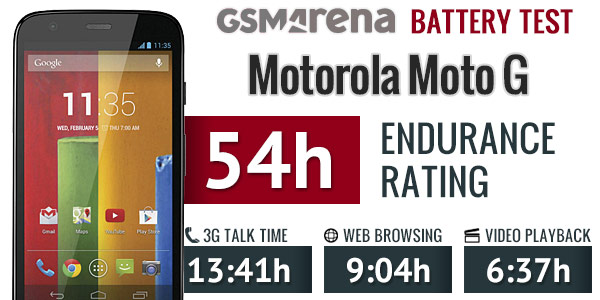
Moto G is powered by 2,070 mAh Non-removable battery With Moto G one can easily last for day of mix usage. GSMArena battery benchmark is about 54H enough for anyone in the age where most budget phones are suffering to last even a full day Moto G will be new era of android :P.
Shocking performence benchmarks...
Moto G beats Nexus 4 in AnTuTu very close to S3 and even faster then S3 in day to day tasks(opening browser, boot up, calling)
>>see all benchmarks on GSMArena<<
Only two drawbacks I found...
1)Limited storage(8GB or 16GB out of which 5.5GB and 13GB is user available respectively), no SD card slot though you can plug sd card reader with USB OTG. You will also get 50GB of google drive space to compensate this.
2)Non-removable battery(not a big deal) and not much awesome camera(it does the job but not meant for photographers)
Detailed list of specs...
quad-band Edge/UMTS/HSPA 3G support
4.5" 16M-color 720p IPS LCD capacitive touchscreen with 326ppi pixel density & Gorilla Glass 3
Android OS v4.4 KitKat
Qualcomm Snapdragon 400 chipset with quad-core 1.2GHz Cortex-A7 CPU with Adreno 305 GPU and 1GB ram
5 MP autofocus camera with LED flash capable of 720p video recording @ 30fps with HDR, continuous autofocus and stereo sound
1.3 MP front-facing camera
Wi-Fi b/g/n & Wi-Fi Hotspot
GPS with A-GPS; GLONASS
8/16GB of built-in storage
microUSB port with USB host OTG.
Bluetooth v4.0 LE
Standard 3.5 mm audio jack
Ambient light; accelerometer; proximity sensors
Active noise cancellation with dedicated mic
50GB of free Google Drive storage for two years
2,070 mAh non-removable battery.
Price ~13k for 8GB model ~15k for 16GB model... subjected to vary on single/dual sim versions.
Who should buy this phone...
Those who have limited budget and want a superfast phone with killer screen can buy this phone. Its best suited for day to day works such as browsing web, Social networks, IMs, Occasional gaming(that can be NFS:MW, Nova 3, Real racing 3 or any other highend game) and some selfies and occasional photography ;).

Get Moto G from flipkart


Baca Selengkapnya ....

How to save battery on your droid

Posted by Unknown Senin, 16 Desember 2013 0 komentar
In this post I'll give you tips to save your Android's battery and a How to get A
FULL DAY battery?
Common tips (anybody can do this with ease) :-
  1. Uncheck the Auto-Brightness and keep brightness to as low as 10%, also lower the screen timeout to 15 or 30 seconds. Add Power Control widget to your homescreen (comes preloaded with most phones). So you can increase brightness whenever necessary.
  2. Don’t use Live wallpapers, If possible keep your background completely black, Black color is battery-friendly as well as eyeball friendly.
  3. Don't keep Mobile data (2G/3G)/Wi-Fi/Bluetooth always on, simply turn off whenever not required.
  4. GPS is another biggest battery eater. Don't turn on GPS unless you need accurate data (for navigation).
  5. Turn off (or keep at least 1HR time between auto-refresh) BACKGROUND SYNC from social apps/web app, If you really don’t need them. e.g.
  6. Facebook, Twitter, TapaTalk, G+.
  7. Turn OFF vibrate/Haptic feedback feature as it consumes a lot of juice.
  8. Use WI-Fi whenever available (at home), it impacts less on battery comparing to mobile data connection.
  9. Disable bloatwares on your phone e.g. Samsung's S apps WARNING: Don't disable important system app.How to do this...Go to Settings->Apps->All apps->Select app(e.g. Samsung apps store)->disable.
  10. Weak cell signals may cause battery drain to increase dramatically, because radio will try a lot to establish connection. So if you know there is very few possibility of getting connection then better turn on the Flight mode temporarily.
  11. Don't use WEB based widgets unless you really need them. They increase load on CPU and indirectly on battery.
  12. Some apps wakes your device partially to collect data aka a "WAKE LOCK". This happens many times in day. Run the app Wake lock detector and find out which app is causing too much wake locks. Wake locks increase battery drain. IMs are generally biggest source of wakelocks, Google apps are second.
  13. Don’t use task killer/RAM Boosters.
  14. Reboot your phone at least once in week. (Press and hold power button —> select shutdown -> wait untill it shuts down -> to start again press and hold power button)
  15. Remove additional accounts (setting->accounts) from phone if you don’t use them.
  16. Don't let your phone getting too much hot. This improves battery lifespan.
  17. If you have 3G connection then Switch to GSM (2G) while browsing and switch to WCDMA (3G) when you want to download files or want to surf faster. 
  18. Use Opera mini browser for just browsing its way faster than others and light on resources (battery, CPU)
  19. Turn off Auto-Rotation when not required. Still you can’t get a day long battery then carry portable power banks

Advance tips:-
WARNING: I am not responsible for any thermonuclear wars, bricked phones. Rooting voids warranty, do it at your own risk. Do your own research before
doing anything.
  1. *ROOT* Use Greenify (or Titanium backup) app and freeze useless appse.g. Social apps. WARNING: If you freeze IM apps you won’t get any message until you de-freeze it again.
  2. Clear you cache at least once in month... Do this by Going to recovery —>Clear cache partition.
  3. *ROOT* Undervolt/Underclock your device by using SetCPU when you don’t need much processor power.
  4. *ROOT* Uninstall bloatwares which are useless in most cases. if you are not sure about certain app then better do a GOOGLE search about it.
  5. Use app Tasker it is multipurpose tool to automate android by creating different profiles (e.g. turn off connectivity when display is turned off for more than 5 minute and so on)
  6. *highlyAdvance* Install any battery friendly Kernel (such as Franco).
  7. *highlyAdvance* Set to powersaver Kernel governors when you don't need performence.

Baca Selengkapnya ....

Why Android Tablet PCs Are Today's Best-buys

Posted by Unknown Kamis, 20 Juni 2013 0 komentar
Using the numerous software and hardware items that exist available on the market, it is extremely hard for the typical consumer to select which method is best. In the end, you can not expect everyone to understand about all of the technical specifications of these an item. Not everybody knows what disk space, RAM, and processors are.

The conventional practice of customers is that they look for a trustworthy company that receives the very best reviews from experts. After that, they choose items that appear to be best to them. The present trend of customers today is that they go for Android Tablet Computers.


However, there shouldn't be any hesitancy if this involves purchasing such tablets since they're not every for show. TabletPcsSource.com can help you understand why you need to buy an Android Tablet without explaining inside a much technical language. If you wish to own the very best PC offered currently available, continue reading:

Inspecting the outside
Most Tablet Computers, although apparently fragile due to their swivel touch screen forms, are actually made durable due to using fiber glass, carbon, or perhaps rubber casings. If you're afraid the Android Tablet doesn't suit you since you live an energetic lifestyle or perhaps a self-announced klutz, fear forget about.

Named Computers on Android are made to last the conventional put on that's felt by every other PC type. If you're still reluctant, TabletPcsSource.com suggests you to definitely buy a product with warranty to assist quell your fears.

Searching in the Hardware
The Android Tablet is a superb match holiday to a PC device when it comes to speed, software stability, efficiency, as well as compatibility to 1000's of programs you are able to download online. This really is one likely reason this pc tablet by having an android is made of a best-seller of TabletPcsSource. If you don't comprehend the technical specifications of common Computers you discover available on the market, this is a simple method to know how good the Android Tablet is:

Any music lover may have enough memory to help keep 1000's of tunes. Doing offers inside your Tablet can also be easily because it doesn't hang, because of its ultra-fast processor. Your Android Tablet may also sustain hrs of continuous use due to its RAM (or Ram) that may function effortlessly for more than 24 hrs.

Where for the greatest Android PC Tablet Deals
If you're now believing that the Android Tablet is the best for you, you're ready to discover the finest PC Tablet deals to obtain discount rates! We highly recommend that you simply obtain reliable online retailers for example at TabletPcsSource.com because discount rates will always be provided to their customers. Plus, you frequently get giveaways and extended warranties for the purchase.

Make certain to check out the inclusions from the item you need to buy to become obvious on what you should receive together with your item. Simply pay together with your charge card and watch for your item to become shipped in 24-48 hrs. Looking for a PC Tablet has not been this type of breeze!


Related Article :
The Best Characteristics Of A Cheap Android Tablet
ARTIKEL 15

Back to Homepage > Cheap Tablet Review From mBak Nani 

Baca Selengkapnya ....

Why Is Cheap Android Tablet The Best

Posted by Unknown Sabtu, 15 Juni 2013 0 komentar
Android tablets are the state-of-the-art and incredible inventions of history decade. Their technologies are impressive and they're very helpful and multi purpose. Furthermore, they are simple to use plus they include numerous programs and enhanced features.

They've become increasingly popular within the last few years and they're always obtaining new fans. Still, you will find persons that do not think that this product provides extensive benefits. These people must read the list below of benefits.


The finest benefit of the Android tablet is the fact that it's portable. The unit is light and it has a little size and could be moved anywhere you would like. They weigh almost 500 grams and they are more compact than an A4 paper sheet. Next, an inexpensive

Android tablet is reasonable due to its convenient prices. The most recent mobile phone models may be a little pricey because of their enhanced programs featuring. However, a mid-range tablet costs under a laptop. The typical cost for this type of system is $200.

Customizing your Android tablet is very easy. You just need to install your preferred programs. Furthermore, you can include various add-ons and skills, in order to personalize the phone. With simply one touch, you'll have a unique and amazing tablet.

Another component that props up recognition from the Android tablets is always that they may be used to browse social networking systems, to hear music in order to watch videos. They provide a first class image along with a sharp clearness because of their large screens.

The web connectivity is yet another aspect to be considered. The 3rd generation broadband and also the Wi-Fi products will give you high-speed internet. You are able to connect immediately if you're in a space that provides Wi-Fi access. You do not need additional products and wires to remain associated with your buddies.

The Android Operating System features lots of programs. You can easily go into the Android Marketplace and you will have the ability to download applications like Facebook, Gmail and YouTube. Simultaneously, you can usually benefit from numerous fun programs and games. Lastly, an inexpensive Android tablet includes a fancy, stylish and advanced appearance, representing among the coolest and best products available.

An Android tablet may be used by both an easy person along with a technology fan. They are a good investment and they are very helpful. Its programs featuring could make you long for this type of device.


Related Article :
The Best Characteristics Of A Cheap Android Tablet
Review Of Teclast P85 Android 4.0 8 Inch Multi-touch Screen Tablet PC

Back to Homepage > Cheap Tablet Review From mBak Nani   

Baca Selengkapnya ....

Get The Best Deals On Cheap Android Tablet

Posted by Unknown Kamis, 13 Juni 2013 0 komentar
Cheap Android Tablet provides a lot of support for users, when compared with the low price, Android tablet opens the opportunity for everyone to be creative with the tablet. Tablet is no longer a luxury item for children and adults from all walks of life.

Re-arrangement of devise additionally to create is additional in direction of cheap Android tablet 4. digital camera interface, with movie recording countenance supporting 1080P collectively having a manufacturer new digital camera path simultaneously.


The camera might be began out underneath the premise within the pressure area lock along with the photo in direction of might be submitted in direction of Yahoo + Gmail, Flicker, etc. area options good following the images are taken.

It's understanding a status which allows it in direction of shoot numerous pictures continuously. a producer new built-in photo in direction of editor is capable of features including filters, crop, remove, eradicate red-colored-eye. Throughout the gallery, the completely new method also includes a photograph in direction of editor, supporting an extensive selection of photo in direction of effects.

Cheap Android tablet is outfitted possessing a producer new web browser you are able to achieve real-time preview function. You are able to near all browser tabs possessing only one gesture additionally to possess fast entry in direction of the desktop edition within the site.

Cheap android tablet hold the ability in direction of instantly synchronize information while using Chrome browser. Using its Gmail electric mail service, you are able to preview the 2-line e-mail content. Using its integrated research function, you are able to boost the offline research purpose in direction of possess entry in direction of the
messages acquired throughout the previous thirty days.

Developed versions of grownup males additionally to ladies make contact with requires photos of grownup males additionally to ladies because the core, integrating social networking additionally to upgrading the make contact with connect additionally to signature.

Cheap Android tablet too give a "reserve in support of offline browsing" attribute, somewhat similar using the objective of iOS5. Google's advancement lays all laterally the build of off-line browsing, that the browser won't instantly acquire articles.

Additionally, Yahoo features the Yahoo sound files Beta in receipt of the try, which enables using the aim of you upload 20000 tunes in direction of Yahoo cloud servers, instantly create a playlist additionally to playback in almost any equipment using the aim of facilitates expensive, we've intent in direction of believe using the aim of provision of electronic video, sound files options underneath the effect within the Pasture will even look throughout the Android.


Related Article :
Why To Choose The Android Tablet ?
Cheap Android Tablet Is The Best Invention

Back to Homepage > Cheap Tablet Review From mBak Nani

Baca Selengkapnya ....

The Google Android Tablet Your Best Choice

Posted by Unknown Rabu, 12 Juni 2013 0 komentar
Should you stick to the Android market news, you may have heard an opportunity of knowing numerous Android OS tablet forms. You will find a lot of Android products and a number of them don't become qualified as Google's Android tablets.

The very first factor about Android OS tablet is it works on the Android operating system. In 2005, Android only agreed to be small businesses that worked with developing the OS's for traveling with a laptop. In those days Linux engine was on use within development of open reason for OS.


Based on the Android application news, a lot more than 400 million mobile products make use of the Android operating-system. Google getting that character of utilizing dessert names for his or her Android items and Android operating-system.

New edition from the dessert named Android products would be the Jelly Bean Version, which follows the Frozen Treats Sandwich. These products from Google took the marketplace by storm since many customers submit with them.

News on Android signifies that individuals who wish to make use of the Android OS tablet first must know its difference in the iPad, that is apples top tablet PC. The primary difference around the two is around the OS, the iPad utilizes a closed OS, meaning it utilizes a secret code that just Apple is aware of.

With this particular, the simplicity of creating programs around the two tablets is available in light. Closed OS for iPads have applications which are particularly built-in as the one for Android is flexible and provide room to application creation. For this reason Android market news keeps announcing of recent application in comparison to Apple. Benefit of the Apple is the fact that its application store has lots of applications since they're veteran within this market.

Android article that are being written every day implies that soon Android applications will one-up individuals of Apple's in the application store. Android market or quite simply google's play implies that now you will find 600,000 applications which make Google's Android tablet the best option.

The Apple application store however, has 650,000 application. Trending news on Android signifies that right now the amount of applications within the Android store is much more undoubtedly in comparison to individuals of the rivals the Apple.

The greatest advantage that you will get if you select Android OS tablets is it is cost saving, spent less for excellent products. Should you go to the Android market, you're able to have much and something advantages of Android OS tablets.


Baca Selengkapnya ....
Trik SEO Terbaru support Online Shop Baju Wanita - Original design by Bamz | Copyright of android amazon.