Bluetooth A2DP problem on Android will solved in next update release

Posted by Unknown Sabtu, 23 Februari 2013 0 komentar
Google from android bug tracker confirm will solved the bluetooth a2dp audio streaming in next android update. It's official that we learn in a story very comforting that we hope will be accompanied by other information on the upcoming release of Android. In fact, Google has confirmed a few minutes in the next release of Android will be solved the bug audio streaming via Bluetooth A2DP, which makes it currently impossible more often than not hear the audio.this perfect and more userfriendly
solve a2dp bluetooth problem on android

This problem has been posted in the section concerning the Nexus 7 but it's a General fix that will be applied on all Android devices can be updated to the newest version of the operating system. Unfortunately, however, it was not possible to find information about the next version of Android but, with a probability of 90%, we believe that will be the 4.2.2, which is a minor update that will correct presumably this and other minor bugs.

google confirm fix a2dp bluetooth problem
source : android bug tracker

Android 4.2, you know, was released with some bugs to fix such as in this case the bluetooth a2dp problem, and little by little it seems that Google is solving them, although to be honest we expected a more convinced reaction and quick by developers of Android.
Lastly, no information seems to be leaked, even regarding a possible release date of the update, but we hope to not have to wait long. The next version of Android now seems very close to release officially.

Baca Selengkapnya ....

How To Set Camera Panorama Mode On Samsung Galaxy S3

Posted by Unknown 0 komentar
Hello everyone, today i will present to you a small guide on how to start a panorama mode function in the camera of Galaxy S 3.
As you know, the Samsung Galaxy S3 device has a good performing camera and effects and settings that make it up are really many. You can manually change many settings shutter, so as to resemble this camera a real SLR, but we'll just like setting the Panorama mode to make unique shots at 180°.this perfect and more userfriendly
how to set campera panorama on galaxy s3
Before we start i will give some review of the excess of Galaxy S3 Camera
Buddy photoshare-simple photo sharing and various images with your friends using the face recognition. For example, the phone suggests who to send, among our contacts in the phonebook, the photos via email or MMS.
Camera "Zero Shutter Lag" the camera starts up in 990 milliseconds and snaps photos instantly, as soon as you press the shutter button. Record-breaking performance: up to 3.3 pictures per second.


Requirements
  • Prepare your Samsung Galaxy Galaxy S3.
  • Have your camera free of encumbrances.
  • A subject , so you can take the picture of the subject.


Set Camera Panorama Mode On Galaxy S3
  1. First take your Galaxy S III and sbloccatene the screen.
  2. Now go on the camera and put the phone horizontally to achieve a wider and better photography from the qualitative point of view.
  3. Click the icon in the lower left hand corner, the gear shaped and scroll through the options until you find the one that says "shutter Mode".
  4. Click and you will open a new menu where you will see various options. Scroll down until you find the one that says "Panorama". It is easily recognizable because it has the icon of a mountain nearby.
  5. Once you find the icon, click on it and you take a picture in Landscape mode.


IMPORTANT: The Panorama mode will remain active on galaxy s3 until the camera will remain open. As soon as the lock, it will return to its default shutter mode and then to make a new picture in Panorama mode, you will need to rerun the entire procedure again.

Baca Selengkapnya ....

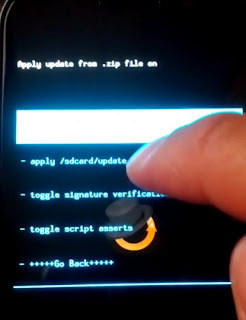
Easy Tutorial Install CWM 6 On Galaxy Nexus

Posted by Unknown 0 komentar
Today, Available the update for ClockworkMod version 6.0.1.9 and is fully compatible with Android 4.2, in this article we present a guide on how to install it on Galaxy Nexus. Below you can see the preview of cwm v 6 on Galaxy Nexus.this perfect and more userfriendly

tutorial install cwm v 6 on galaxy nexus

With Android 4.2, introduces a new and interesting function, multi-user, available for now only on tablet. For another new features you can read on list of android 4.2 new features. The data storage structure is able to store data from multiple users, and this might give rise to problems with the use of old clockworkmod recovery, for this reason the forum XDA developers, they are put to work and have released version optimized for Jelly Bean 4.2 and today we want to take a guide on how to install CWM 6 on Galaxy Nexus


With the new version of clockworkmod recovery, all your data is stored in a folder. You can flash the recovery in two ways, either through the zip or via fastboot, the choice is yours. Via zip, you won't have to download the recovery from here, copy it into your smartphone's SD and then flash it. Via fastboot instead you must follow these steps:

Read First
Do with your own Risk

How To install CWM 6 On Galaxy Nexus

  1. Start your smartphone in bootloader mode
  2. Open the terminal as an administrator
  3. Go to the Android SDK/Platform path Tools
  4. Copy the recovery at its core
  5. Rename the recovery recovery.img
  6. Connect your smartphone to your PC
  7. Fastboot flash recovery recovery.img type
  8. Wait until the end of the process and restart

Requirements To Install CWM

The steps as you see is really very simple, the method above requires:
  • Android SDK
  • The recovery, you can download on Download latest CWM 6
  • A USB cable to connect your smartphone to your PC
  • Samsung Galaxy Nexus Drivers
  • The fastboot


The new recovery is fully compatible with Jelly Bean 4.2, you shouldn't encounter any problems on. Apparently by updating your smartphone and fitting an old recovery, problems may arise during the backup, but with the new version of these problems are just a bad memory.

Have you flash the recovery? Are you notice any changes and improvements? Or have you come across any other problems? Please tell on comment area

Baca Selengkapnya ....

Easy Tutorial Install CWM Touch Recovery On Google Nexus S

Posted by Unknown 0 komentar
In this article published this morning i will share about how to install clockworkmod touch recovery on Samsung Google Nexus S. I will also illustrated the features from the revolutionary new cwm Touch Recovery. Touch recovery is ClockworkMod recovery based, with the ability to use the touch screen directly from our device in place of the "old" physical keys. So when you modding your nexus s rom you can configure it with your touch screen. below is the preview of new touch recovery on nexus s
how to install cwm touch recovery on nexus s

As mentioned in article, we've prepared a simple guide to install this new Recovery. In this guide, we will explain also How to switch back to classic Recovery for users who still don't familiar with this new version and want to return to physical keys.

Before start the tutorial, i will give some review about Google Nexus S
The collaboration between Samsung and Google increasingly strengthened. A clear example of this new device, the Nexus S 4 g, did produce from Google. The version for the European market supports Quadband GSM networks, for optimal coverage in all situations thanks to UMTS. Display Internet pages without problems will be the responsibility of HTML browser, thanks to the valuable support rendered by HSDPA, modem for speed equal to the ADSL at home. You can also take advantage of the distributed networks thanks to built-in Wi-Fi antenna. There is of course the Bluetooth to connect to compatible devices.this perfect and more userfriendly

Read First
Tutorial For Android assume no responsibility for the damage that maybe caused if you failed do the process. Because i have practiced it and anything works perfect.
The procedure is very simple. just follow all the steps properly so as not to have any kind of problem.

Requirements


How To Install Touch Recovery On Nexus S
  1. First you must unlock the bootloader and set the fastboot, you can search from google to find the tutorial
  2. From the command prompt, type the following command: fastboot flash recovery recovery-clockwork-touch-5.8.0.2-crespo.img
  3. Wait a few seconds and, if everything was successful, you'll get an Ok followed by confirmation of the procedure of flash
  4. Type the following command to restart the Nexus: fastboot reboot

Restoring Recovery Non-Touch
  1. Switch off the Nexus and start fresh in nuovamete Nexus Bootloader mode (Volume up + Power)
  2. Start command Promt again
  3. Type the following command: fastboot flash recovery recovery-clockwork-5.0.2.0-crespo.img
  4. Wait a few seconds and, if everything was successful, you'll get an Ok followed by confirmation of the procedure of flash
  5. Type the following command to restart the Nexus: fastboot reboot

Now, after installing, just restart your Nexus S in Recovery Mode and try the new ClockworkMod Touch Recovery that just installed. Ready to try it? What are you waiting for then! Go to install it!

Finish now you have succesfully install touch recovery on Samsung Google Nexus S. If you need any fyrther assistant or ask some question you can leave your question on comment area below

Baca Selengkapnya ....

Samsung Has Launched The Galaxy S4 Secretly In CES 2013 ?

Posted by Unknown 0 komentar
In a recent report that we could learn that Samsung would have presented at CES 2013 its new flagship smartphone, is the Galaxy S4. The presentation should take place behind closed doors in secret with the mere presence of those few people invited to the event press. In this regard, there are new rumors that we cannot confirm the 100% but that would disclose any interesting news about the new smartphone.this perfect and more userfriendly

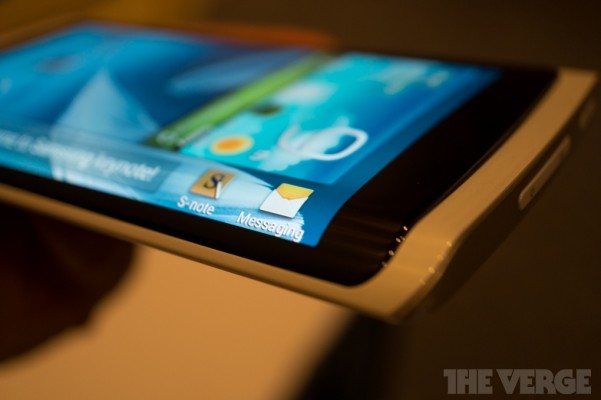
Firstly, there was the much rumored closed door presentation of the galaxy s4, a smartphone that mention working perfectly with no problems whatsoever and with software aboard a TouchWiz UI heavily customized. The Samsung Galaxy S4, always according to the latest reports, would be very similar to your smartphone with YOUM display presented by the company during the CES 2013, with a curvature of the display located on the sides which would arise as an extension of the whole user interface. The same curvature would be present on Galaxy S4. If you don't know read first what is YOUM Display

galaxy s4 secretly launch in ces 2013


In this way it would be possible to display in horizontal text messages and icons in the side of the smartphone, characterized by curving outwards. Thanks to this it will also be possible to see text messages scroll on the side of the display without unblocking of all your smartphone to view them.

Details don't seem to be received even though we're pretty sure that the device will have a 5 inch display with Full HD resolution. The will that expressed by Samsung at the event just ended is to want to equip new YOUM display on Samsung Galaxy series devices in the near future, which now looks really close.

Ultimately we remind you that all this information is to be taken with some caution because we cannot have full assurance of the reality of things. We leave you with a question to which we hope will answer many: according to you it would be useful to a display like that on a smartphone or you think YOUM displays should be used only for the creation of new types of devices as accessories or anything?

Baca Selengkapnya ....

Samsung Introduces Youm Display and The Green LCD In CES 2013

Posted by Unknown 0 komentar
It's for a very long time that Samsung is make discussion about themselves not only as regards its Android Device but also as regards the flexibility of OLED display. Finally at CES 2013 Samsung officially presents the new generation of flexible display called Youm display and also a new display type called Green LCD.this perfect and more userfriendly

What is Youm Display

The flexibility from Youm display are realized with OLED technology, so basically they're like AMOLED display collapsible.
Their use, although now may not be fully understood, is varied. In fact we think for example to devices like the Galaxy 2 Notes, is very large, buwith this new display type can get smaller because of the display can be folded on itself. This should reduce considerably the dimensions, all to the advantage of portability.
youm display galaxy s4

Below we have listed the images and the first video of the first Samsung smartphone with the new display Youm, whose use is not yet clear when there will be and at what price, although we can imagine that devices with this kind of display will be quite expensive.


oled display technology

whati is youm display


The Green LCDdisplay are not displays will find employment in smartphone field but in the tablet. It's power-saving screens that are able to consume 25% less than what we have today, all in favour of greater autonomy on your device.

Conclusion

In conclusion, although it is not certain, we can speculate that the Galaxy S4 will use Youm display and we dream it can be equipped with an Exynos 5 octa core like that presented a few hours ago.

Baca Selengkapnya ....

Samsung Exynos 5 eight core processor | CES 2013

Posted by Unknown 0 komentar
The new generation of hardware for the mobile never ceases to amaze, in this article we will discuss about new eight core processor it is exynos 5 Octa. These days, at the CES in Las Vegas, all major manufacturers are showing new products they intend to introduce for this year: first, with the new NVIDIA Tegra 4 and its amazing performance; Qualcomm with the new Snapdragon; last date is Samsung, which presents the new Exynos 5 Octa. As the name suggests, it is eight-core processors.

Actually there are eight core processor as we used to think: as in Tegra 3 and 4 there is a fifth, called core from NVIDIA "companion core", so in the new Octa 5 Exynos there are eight core for high performance and energy-saving core. The 4 core Cortex-A15 operating at 1.8 GHz, designed to address situations where serves brute power, are in fact joined 4 core Cortex-A7 with 1.2 GHz frequency which allow you to handle situations that require relatively little computing power and that it is imperative to saving.

The procedures are similar to those already seen on Tegra, with Cortex-A5 and A7 which operate until you start an application that requires a lot of resources (e.g. games), when you start the 4 core Cortex-A15 poking into her own hands. All eight cores are manufactured to 28nm and exploit the technology of big ARM ".LITTLE ". Icing on the cake is the use of a new GPU(kinds of android GPU), as announced by Samsung, can double the performance by lowering the consumption of 70%.

Exynos 5 With 8 Core Processor

samsung exynos5 eight core processor

There are no news about smartphone or tablet that can use this chip, but certainly over the coming months we will see the first devices that take this fruit of high technology.

Baca Selengkapnya ....
Trik SEO Terbaru support Online Shop Baju Wanita - Original design by Bamz | Copyright of android amazon.