Recharge Your Mobile Balance With DBBL/BRAC ATM/Visa or Master Card !
Kamis, 20 Januari 2011
0
komentar
Do you want to recharge your mobile balance or buy a mobile pre-paid recharge card right now from internet using your bank account, credit card, bKash, PayPal or any other e-wallet? If so, Go on. this post is very interesting for you.
Not only mobile, this post will show you how and where you can buy Banglalion or Qubee Wi-Max Pre-paid cards or pay your post paid bills using the same payment methods through internet.
Here I am going to share a very exiting news with all you guys. It's clear that the Dutch Bangla Bank Ltd. [DBBL] and BRAC Bank Ltd. are the two most popular online Banks in Bangladesh at this present times. Because they are always providing us all the latest banking facilities or features like Local ATM services, Debit Cards, Visa & Mestro Master cards Credit Cards, Online & SMS Banking etc before others. and they have a massive popularity.

And this time they have been added an another Ultimate service with an associations of amarbill.com, easy.com, payto.mobi.com. That is Online Mobile recharge by using their Debit/Credit Cards which is associated with your account!
Nothing to worry about the transactions, this system is 100% secure and safe. Because your card information will be taken in a website which is verified by the both banks.
You can Recharge your Mobile Balance or Buy WiMax cards or Pay bills Through this Sites:
www.paytomobi.com
www.amarbill.com
www.easy.com.bd
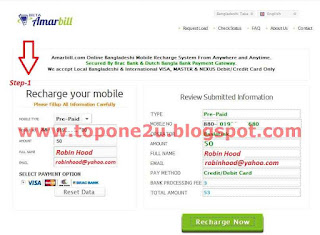
2. Select Pre-Paid or Post-Paid and put your full name, mobile number, recharge amount, email address and then Recharge Now.
3. You will see your transaction details like this. Press Pay Now.
 4. Next you will be promoted to select your payment method [Visa/Master/DBBL Nexus Card]. Select DBBL & Click 'Proceed To Pay'.
 5. Now you will see DBBL page with a blank form like this picture.
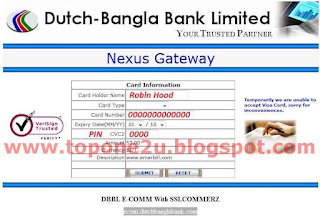 6. Fill the form with your card information. Do not modify ‘Expiry Date’ option, leave it blank !
7. Click submit. your browser could show this massage click Continue.
 8. and wait to see this.
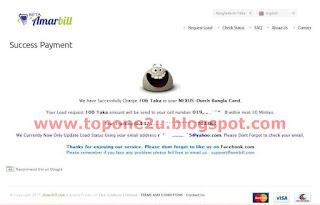 9. It will take few seconds and you will get a recharge massage on your mobile from your operator with your recharge details. Congratulations !
See also:
How To Have A Verified PayPal Account From Bangladesh
Please feel free to leave your feedback about this service or post !
Not only mobile, this post will show you how and where you can buy Banglalion or Qubee Wi-Max Pre-paid cards or pay your post paid bills using the same payment methods through internet.
Here I am going to share a very exiting news with all you guys. It's clear that the Dutch Bangla Bank Ltd. [DBBL] and BRAC Bank Ltd. are the two most popular online Banks in Bangladesh at this present times. Because they are always providing us all the latest banking facilities or features like Local ATM services, Debit Cards, Visa & Mestro Master cards Credit Cards, Online & SMS Banking etc before others. and they have a massive popularity.

And this time they have been added an another Ultimate service with an associations of amarbill.com, easy.com, payto.mobi.com. That is Online Mobile recharge by using their Debit/Credit Cards which is associated with your account!
Nothing to worry about the transactions, this system is 100% secure and safe. Because your card information will be taken in a website which is verified by the both banks.
You can Recharge your Mobile Balance or Buy WiMax cards or Pay bills Through this Sites:
www.paytomobi.com
www.amarbill.com
www.easy.com.bd
Charges and Others
@Easy: Free!
@PayToMobi:
@Amarbill: Unavailable right now.
@Easy: Free!
@PayToMobi:
@Amarbill: Unavailable right now.
Processing Charge | 2 Tk. Per Card Purchase |
Available Cards | 20 - 100 Tk. |
Support Cards | DBBL/BRAC Debit Card,Visa & Master Card, PayPal, Skrill, Bkash. |
Support Operators | Banglalink.Grameen Phone. Airtel. Robi. TeliTalk & Citycell |
Let’s see, how to recharge mobile balance with DBBL local ATM Nexus Debit Card:
1. Click here and you will be directed to Amarbill's site. fill up the blank form like picture bellow.

2. Select Pre-Paid or Post-Paid and put your full name, mobile number, recharge amount, email address and then Recharge Now.
3. You will see your transaction details like this. Press Pay Now.


7. Click submit. your browser could show this massage click Continue.


See also:
How To Have A Verified PayPal Account From Bangladesh
Please feel free to leave your feedback about this service or post !
Baca Selengkapnya ....


